Why Is Your eSIM Slow in Japan? Fixes That Actually Work (2026)
eSIM slow in Japan? Usually it's lunch-hour congestion, not your phone. Which network each eSIM rides (Aug 2026) plus the fixes that actually work.

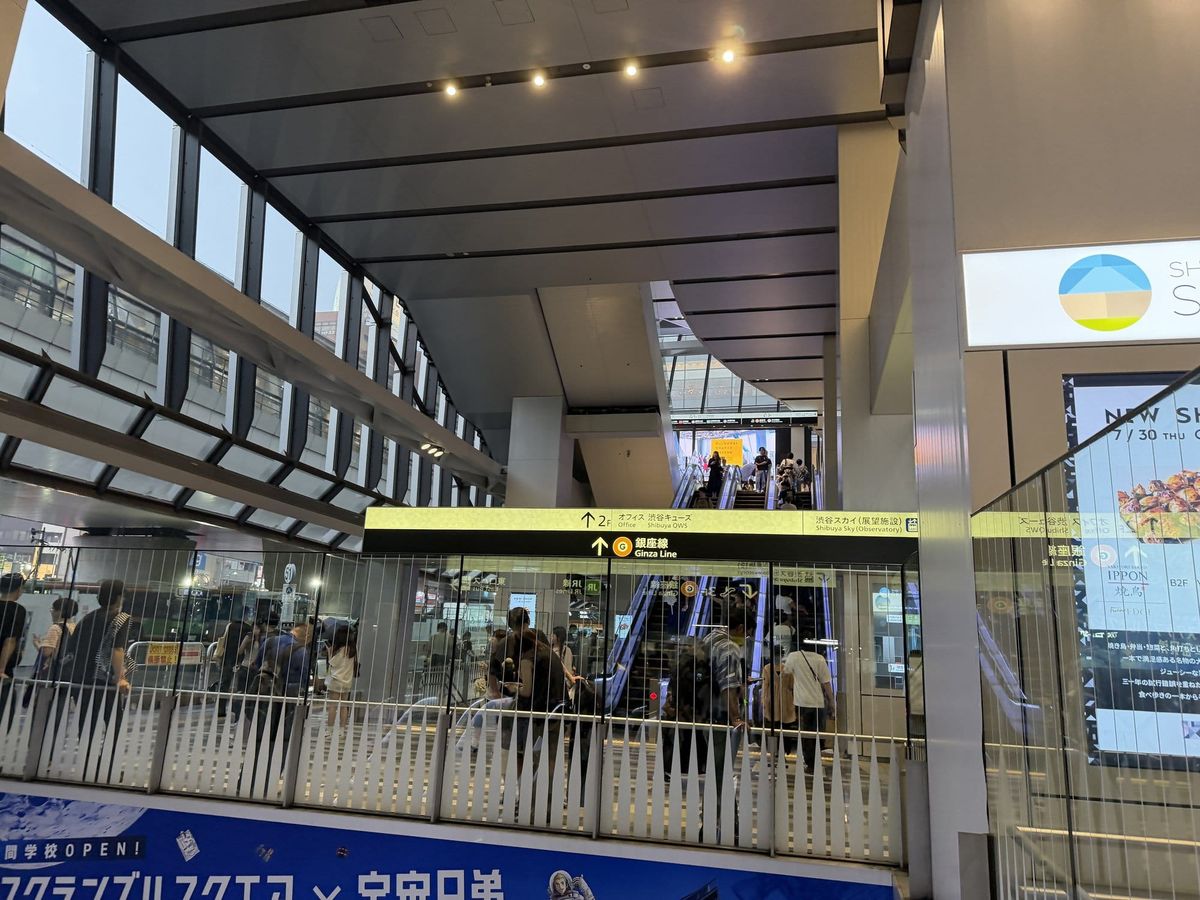
If you just typed “eSIM slow in Japan” into a search bar from a crowded station concourse, the short answer is congestion, not a broken plan. The 4 major travel eSIM brands we compare on this site — Airalo, Ubigi, Holafly and Saily — all resell capacity on Japan's three carrier networks (NTT Docomo, KDDI/au, SoftBank) rather than running their own towers, and only 1 of the 4, Ubigi, is confirmed on Docomo, Japan's largest network (checked August 2026). At lunch hour and during the evening commute around dense spots like Shinjuku and Shibuya, resold capacity is the first thing that feels slow. In our own tests on Saturday, August 1, 2026, all three networks lost 69–94% of their download speed between a quiet residential neighborhood at 1:30 pm and the Shibuya evening crowd. The fastest fixes: step away from the crowd, lock the phone to 4G, or manually select your plan's other partner network — all explained below.
Disclosure: this article contains affiliate links to Airalo. If you buy a plan through one, NipponStays earns a small commission at no extra cost to you. It changes nothing that follows — every fix here works no matter whose eSIM is in your phone.
Why travel eSIMs slow down in Japan
Nearly every travel eSIM sold for Japan is a reseller: the brand buys wholesale capacity or roaming access on NTT Docomo, KDDI/au or SoftBank and retails it as an app-installable plan. That model is why setup is so easy — and why speeds sag when the host network is under load. When a cell site is saturated, everyone on it slows down, and capacity bought wholesale is not first in line.
The pattern is time- and place-shaped, not random. The heavy windows are lunch hour and the evening commute; the heavy places are mega-station concourses, the blocks around Shinjuku and Shibuya, underground malls, and event crowds. Full bars mean strong signal, not spare capacity — a phone can show five bars while data crawls, because thousands of phones are sharing one saturated cell.
Your eSIM is probably fine: the plan that crawls in a concourse at half past noon usually behaves normally in a residential neighborhood at night. And no brand escapes physics — switching helps only when the new plan rides a less-loaded network where you actually stand. Our best eSIM for Japan comparison covers which brand fits which itinerary; this article is about making the one already in your phone behave. We measured that swing ourselves on Saturday, August 1, 2026 — the numbers are in the next section.
What we measured: Shibuya at evening peak vs a quiet Tokyo base
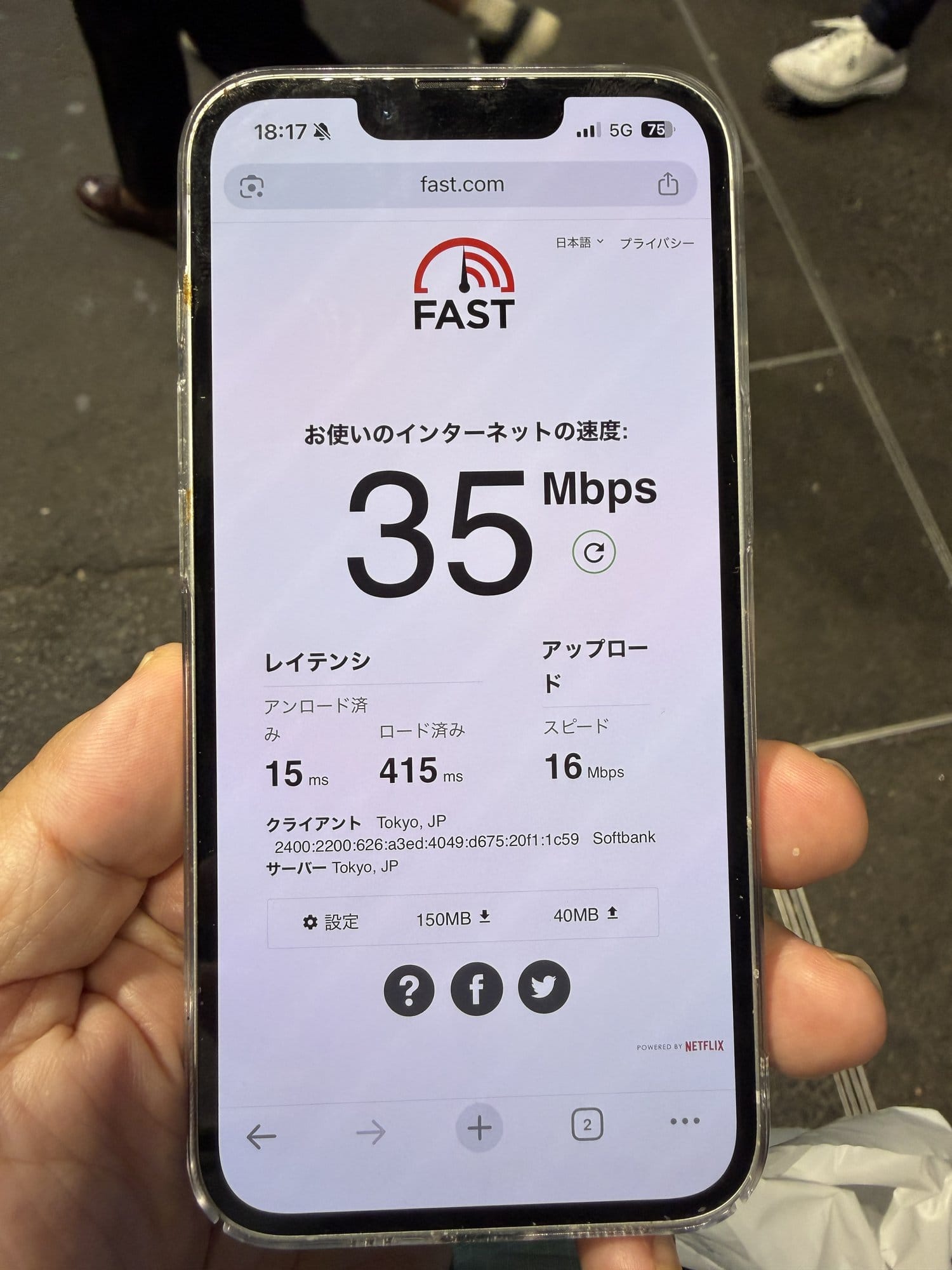
On Saturday, August 1, 2026, we ran the same test on all three Japanese networks twice in one day: from a quiet residential Tokyo base in the early afternoon (around 1:30 pm), then at street level near Shibuya's Scramble Square at evening peak (6:15–6:35 pm). Method: fast.com with the detailed view open, 3 runs per network per location, medians below. Every line is an eSIM — Docomo via ahamo and KDDI/au via povo on an iPhone 17 Pro, SoftBank on an iPhone 16e.
| Network (plan, device) | Home base, ~1:30 pm | Shibuya, ~6:20 pm | Download drop |
|---|---|---|---|
| NTT Docomo (ahamo, iPhone 17 Pro) | 660 Mbps down / 45 up | 89 down / 16 up | −87% |
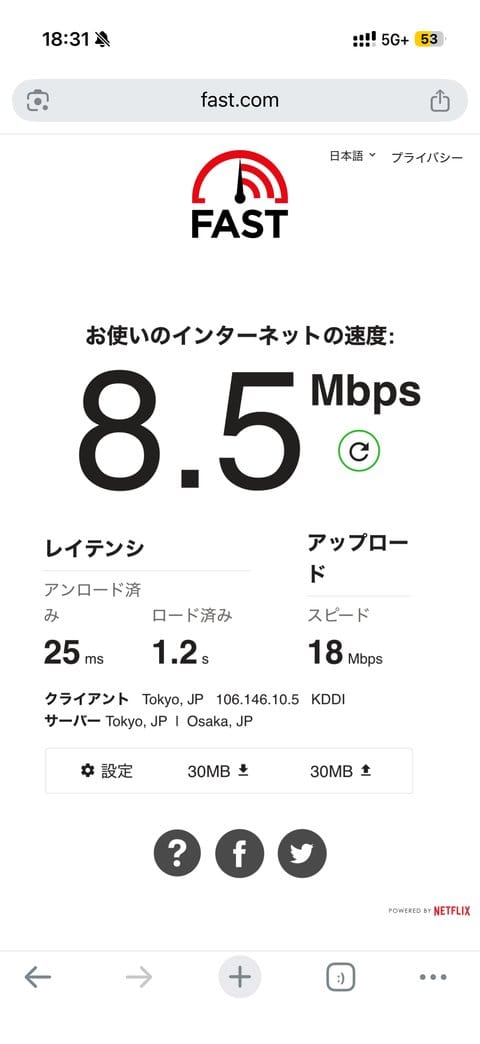
| KDDI/au (povo, iPhone 17 Pro) | 220 down / 9.5 up | 14 down / 14 up | −94% |
| SoftBank (iPhone 16e) | 110 down / 8.7 up | 34 down / 16 up | −69% |
Three findings matter more than the headline numbers:
- Every network lost 69–94% of its download speed between a quiet neighborhood at 1:30 pm and the Shibuya crowd at 6:20 pm — same phones, same day. That swing is the congestion this article is about, measured.
- The 5G icon stayed lit while the experience collapsed. Loaded latency — how long the connection takes to respond once traffic is flowing, the number that decides whether a page actually opens — told the real story: the Docomo line stayed near 0.17 s in the crowd, SoftBank sat around 0.2–0.4 s, and the au line blew out to 0.6–1.2 s while its status bar showed 5G+ the whole time. Full bars, hanging pages — exactly the symptom described above.
- Read these as ceilings for travel eSIMs, not promises. Our lines are the carriers' own consumer brands (ahamo, povo, SoftBank direct). A travel eSIM rides the same radio through wholesale or roaming agreements, so at peak it can match these figures at best — not beat them.
One bonus measurement: we also caught povo with its data topping expired — the state a fixed-allowance eSIM enters when the high-speed data runs out. fast.com read 56 Kbps down, and the test page itself took the better part of a minute to load. If your “slow eSIM” is actually an exhausted allowance dropping you to a 128–300 Kbps tier, that is the treacle you are wading through — check the provider app's usage screen before blaming the network.
Weekday morning in Shibuya (Thursday, August 6, 2026)
We repeated the test at street level in Shibuya on a weekday morning, Thursday, August 6, 2026, between 8:53 and 9:00 am — the tail of the commute. Same method: fast.com with the detailed view open, three runs per network, medians below. Same lines and devices as the Saturday test.
| Network (plan, device) | Three runs, download | Median | Latency under load |
|---|---|---|---|
| KDDI/au (povo, iPhone 17 Pro) | 160 / 80 / 280 Mbps | 160 Mbps (47 up) | 394–921 ms |
| NTT Docomo (ahamo, iPhone 17 Pro) | 110 / 55 / 140 Mbps | 110 Mbps (25 up) | 398–533 ms |
| SoftBank (iPhone 16e) | 12 / 38 (4G) / 110 (5G) Mbps | 38 Mbps (19 up) | 254 ms – 1.3 s |
Two things stand out against the Saturday evening run:
- SoftBank dropped to 4G on two of three runs, at 12 and 38 Mbps. The one run that held 5G returned 110 Mbps — the same phone, the same spot, minutes apart. If your eSIM rides SoftBank, the number on the screen tells you less than whether the handset is on 5G at that moment.
- The ranking flipped. Docomo was fastest on Saturday evening; on this weekday morning au led at 160 Mbps with Docomo at 110. Which network is quickest is a function of time and place, not a fixed league table — another reason to judge a provider by which network it rides rather than by a single headline speed.
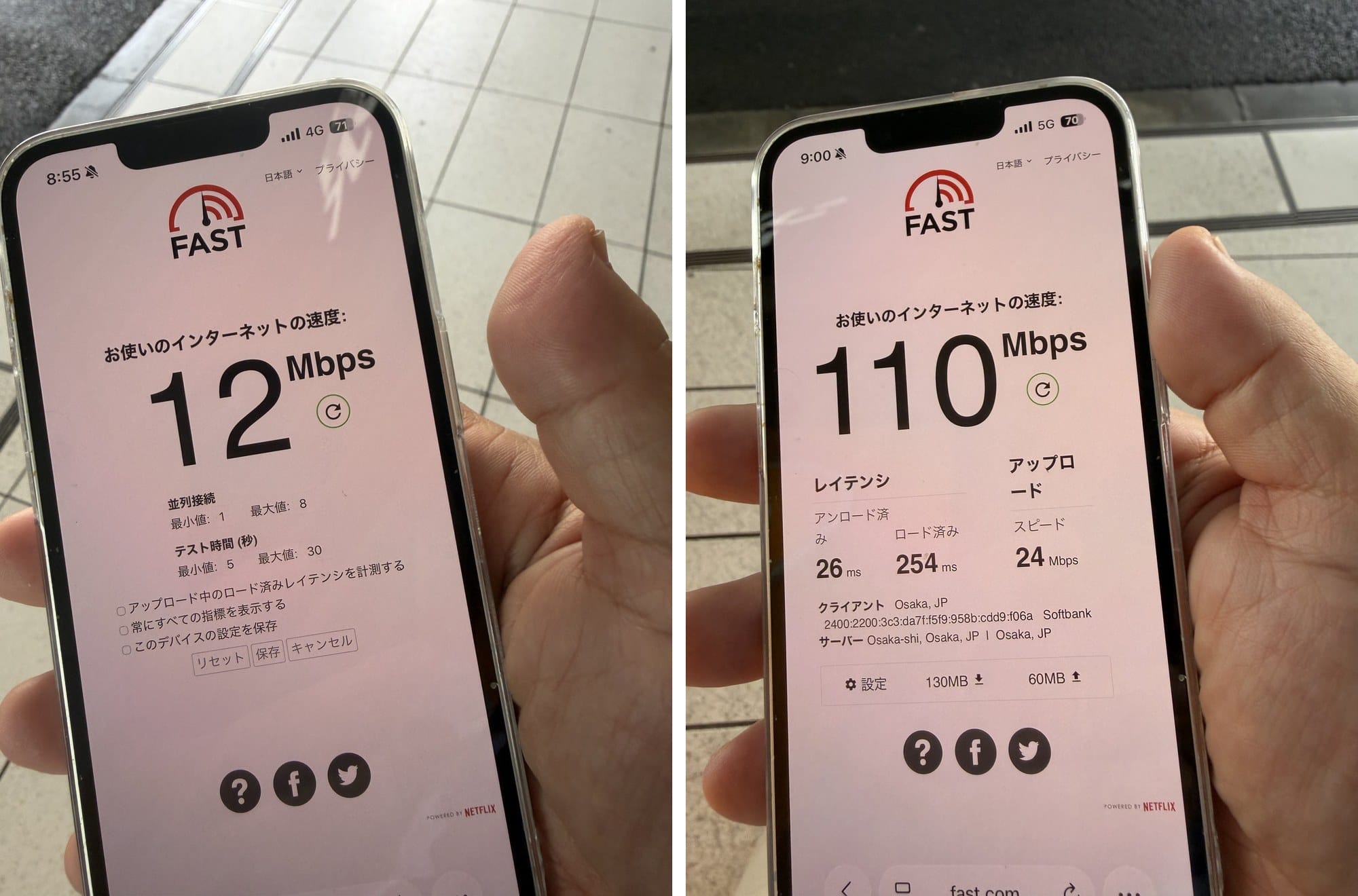
Latency under load stayed poor across all three networks (394 ms to 1.3 seconds), the same pattern we saw at evening peak: a full-signal 5G icon does not mean a responsive connection when the cell is busy.
Which Japanese network is your eSIM riding?
Which host network your eSIM rides decides where and when it slows down, and the mapping differs by brand. The table reflects our checks as of August 2026 — carrier mappings change without notice, so confirm the coverage line on the provider's own plan page before you rely on it.
| Provider | Japan network(s), checked Aug 2026 | What that means when it is slow |
|---|---|---|
| Airalo — Moshi Moshi Japan | SoftBank + KDDI/au | Two partners to switch between — manual network selection is worth trying in a jammed area |
| Ubigi | NTT Docomo + KDDI/au, 5G | The one confirmed on Docomo; best rural reach, but central-Tokyo peak crowds still bite |
| Holafly | SoftBank + KDDI/au | Unlimited data, but hotspot sharing is capped at 1 GB/day (checked August 2026) |
| Saily | SoftBank-led (some plans also list KDDI/au) | If the local SoftBank cell is jammed, there may be nowhere to switch |
Only 1 of these 4 brands is confirmed on NTT Docomo (checked August 2026); the other 3 are built on SoftBank and KDDI/au capacity, which is one reason so many travelers report the same slow spots in central Tokyo. To see which network you are on right now, open Network Selection in your cellular settings — the active network is named there.
The second cause: where your traffic exits to the internet
Many travel eSIMs route your data out of Japan before it reaches the open internet, and that routing — not the radio — is sometimes why everything feels sluggish. Some plans break out locally in Japan; others send a request you make in Osaka to an exchange point in Singapore or Europe and back before the page starts loading. Bandwidth can still test fine; what you feel is latency — pages hesitate, video calls lag, map tiles pop in late.
The check takes ten seconds: open any “what is my IP” site on mobile data. If it places you in Singapore or Frankfurt while you stand in Japan, every request is making that round trip. Providers rarely document their routing, and no phone setting changes it — if this is your bottleneck, the real fix is a plan that breaks out locally, which in practice means testing a second eSIM.
A caveat from our own tests so you do not over-read that check: geo-IP databases misplace even domestic Japanese lines. Standing in Shibuya on Saturday, August 1, 2026, fast.com's client line placed our Docomo phone in Mito and our SoftBank phone in Osaka — and earlier that day, the same SoftBank line tested from a Tokyo desk showed up as Sapporo. That is carrier-grade NAT shuffling addresses within Japan, and it costs you nothing in speed. The red flag is an IP that exits in another country, not another Japanese city.
Fixes that actually work, in order
Work through these in order — the free fixes at the top solve most slow-eSIM cases in Japan.
1. Move, or wait out the peak
Congestion is hyper-local and short-lived. Walking a block from a station entrance, riding an escalator from the basement mall up to street level, or waiting out the lunch spike often restores normal speeds with zero settings changed. If you are staying next to Shinjuku Station (see our Shinjuku area guide), expect the slowest data inside the station complex and better speeds a couple of streets out.
2. Lock the phone to 4G
In dense areas a phone clinging to a busy 5G layer can feel worse than plain 4G. On iPhone: Settings → Cellular → Cellular Data Options → Voice & Data → LTE. On Android: Settings → Connections → Mobile networks → Network mode → LTE/4G. If speeds steady out, keep it there for the city day and switch 5G back on later.
3. Select the partner network manually
If your brand rides two Japanese networks — Airalo and Holafly list SoftBank and KDDI/au as of August 2026 — your phone may simply be camped on the more congested one. Turn off automatic selection (iPhone: Settings → Cellular → Network Selection; Android: inside Mobile networks), wait for the scan, and pick the other listed network. Give it a minute to register, and cycle Airplane Mode once if it stalls. Set it back to Automatic when you move on.
4. Check the APN against the provider's app
A wrong or reset APN usually kills data outright rather than slowing it, but it is a two-minute check: compare the APN your provider's app specifies for the Japan plan with what the eSIM profile shows in your cellular settings — OS updates occasionally reset these. If they differ, correct it and cycle Airplane Mode.
5. Offload the heavy stuff to Wi-Fi
Hotel Wi-Fi in Japan is near-universal and generally solid: queue app updates, photo backups and offline-map downloads for the room, and your daytime data shrinks to maps and messaging, which survive a congested cell far better than video. Starbucks runs free Wi-Fi, and JR East and Tokyo Metro offer it at many stations. Do not count on convenience-store Wi-Fi — FamilyMart ended its free in-store Wi-Fi in 2022, and chain coverage has been shrinking.
6. Buy a second eSIM on a different network
The decision rule: if data is slow only at peak hours in crowded places, a second eSIM will not save you — every network feels the crowd. If it is slow everywhere, including quiet neighborhoods at night, you likely have a network or routing mismatch, and a second eSIM on a different host network is the honest fix; installing one takes minutes over hotel Wi-Fi. If your current plan is SoftBank-led, add Docomo coverage via Ubigi; for the mainstream option, Airalo's Moshi Moshi plans ride SoftBank and KDDI/au. The full network-by-network rundown is in our best eSIM for Japan guide.
What is not the problem
A VPN, your phone, or “Japan's networks being bad” — none of these is the usual culprit. A VPN cannot speed up a congested cell: there is no extra radio capacity for it to unlock, and its encryption and detour through a VPN server add overhead. The reverse test is worth running — a VPN left switched on stacks extra latency on top of any out-of-Japan routing your eSIM does, so turn it off and compare. Claims that a VPN “removes throttling” for travel eSIMs in Japan do not hold up: what you feel in Shinjuku at noon is shared congestion, not throttling aimed at you. If you are running a VPN for a reason unrelated to speed, whether you need a VPN in Japan weighs those reasons on their own terms.
Your phone is almost never the issue either — if hotel Wi-Fi runs fast on the same device, the hardware is fine. The measurable exception is age: same desk, same network, same hour on Saturday, August 1, 2026, a 4G-only iPhone 8 pulled 31 Mbps where a 5G iPhone 17 Pro pulled 220 — if your phone predates 5G, that ceiling is real, though it still does not explain a connection that dies only in crowds. Two real exceptions are worth ruling out in the provider app: some unlimited plans manage speeds after very heavy use under fair-use terms, and hotspot data is often capped separately — Holafly caps hotspot sharing at 1 GB per day on its Japan unlimited plans (checked August 2026). On a fixed allowance, confirm you have not burned through the high-speed portion.
Quick diagnosis: match your symptom
Most slow-eSIM cases in Japan match one of the five patterns below.
| Symptom | Likely cause | What works |
|---|---|---|
| Slow only at lunch or in Shinjuku/Shibuya crowds | Cell congestion | Move a block, wait it out, lock to 4G |
| Slow everywhere, all day, even at night | Wrong host network for your route, or distant breakout | Check IP location; second eSIM on another network |
| Full bars but pages hang before loading | Saturated cell or out-of-Japan routing | Manual network selection; Wi-Fi offload; IP check |
| Fast for days, then suddenly crawling | Fair-use management or exhausted high-speed allowance | Check usage and plan terms in the provider app |
| Hotspot crawls while the phone itself is fine | Separate hotspot cap (e.g. 1 GB/day) | Check tethering terms; use hotel Wi-Fi for laptops |
Which Japanese network your eSIM rides on is decided at purchase, not after you land — which makes it the one variable worth getting right in advance. Ubigi, Saily and Holafly compared against Airalo turns on exactly that point: Ubigi is the only one of the four carrying NTT Docomo.
FAQ: Slow eSIM Data in Japan
Is my eSIM being throttled in Japan?
Usually no. The slowdowns travelers hit in Tokyo at lunch hour or in station crowds are shared congestion on the host network, affecting everyone on that cell. The exceptions: unlimited plans can manage speeds after unusually heavy use, and fixed-data plans drop to a slow tier once the high-speed allowance is used up — both show up in the provider app's usage screen.
Why is my eSIM fast in Kyoto but slow in Tokyo?
Congestion follows crowd density, not coverage quality. The cells around Tokyo's mega-stations serve enormous numbers of phones at lunch and commute hours, while a Kyoto street at the same moment carries a fraction of the load. The same eSIM on the same network can feel completely different in the two places — it is the location, not the plan.
Will a VPN make my eSIM faster in Japan?
No. A VPN adds encryption overhead and an extra server hop, so on a congested network it is neutral at best and slower in practice. If a VPN is already running, switch it off and retest — its detour abroad stacks latency on top of whatever routing the eSIM itself uses.
Should I use 4G instead of 5G in Japan?
Test it whenever data feels slow in a city crowd. Phones sometimes hold a busy 5G connection when the 4G layer would move data more steadily, and locking to LTE/4G is reversible in seconds. In quieter areas leave 5G on — where the network is not crowded, it is simply faster.
Information audit: Last fact-checked August 2026 · Prices checked August 2026 (all rates are “from” floors that vary by season) · Carrier mappings for travel eSIMs (which Japanese networks Airalo, Ubigi, Holafly and Saily ride) are checked August 2026 and change without notice — confirm on each provider's coverage page before buying. All speed figures are our own fast.com measurements taken Saturday, August 1, 2026 (residential-Tokyo baseline vs Shibuya evening peak; devices and eSIM plans disclosed in the article). · How this guide was researched: hotel facilities, prices and access details are verified against official and primary sources; we have not personally stayed at every property listed. The author is based in Japan and uses domestic mobile networks day to day · How this site verifies information: About NipponStays.